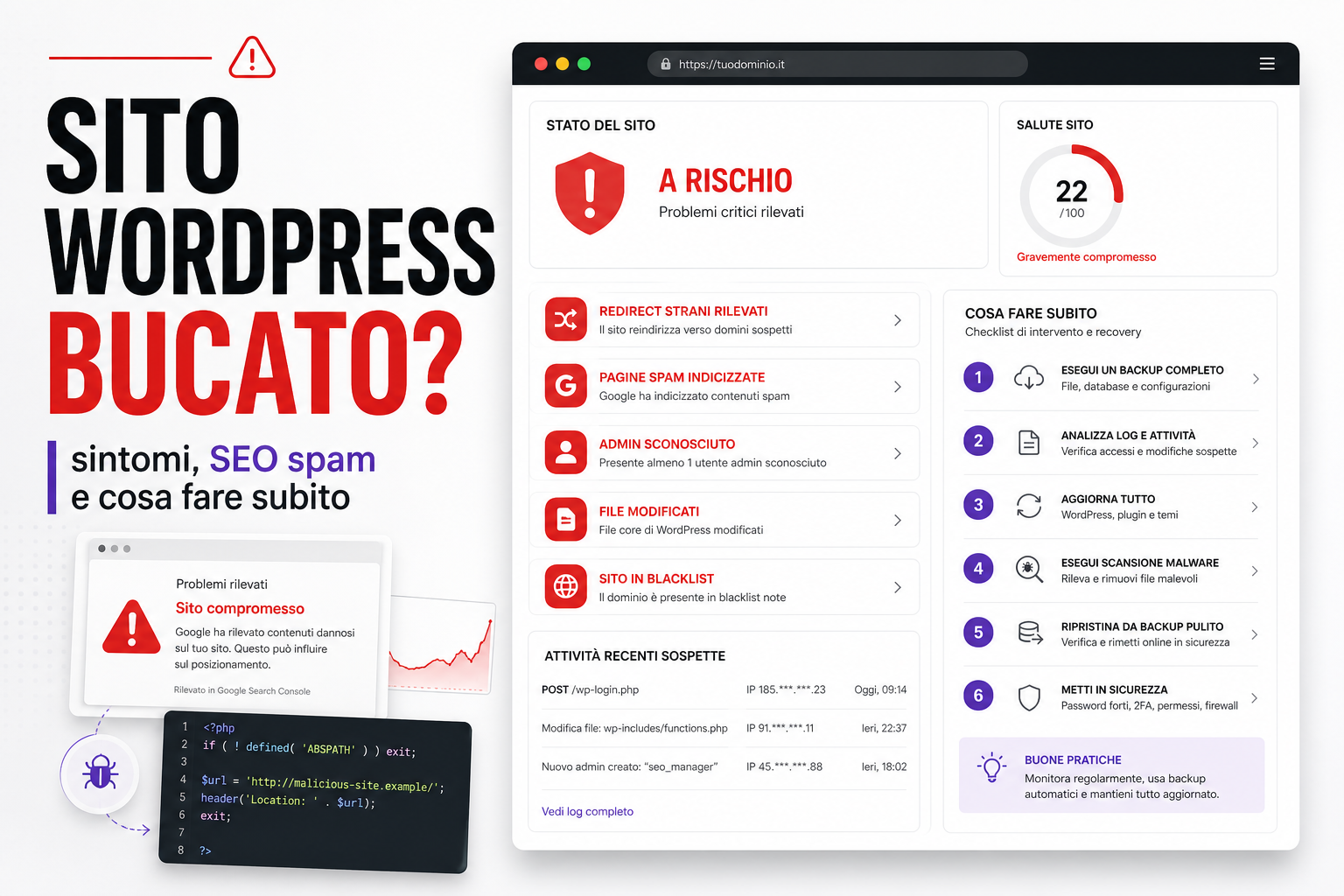
A hacked WordPress site is not just a technical problem. It can become an SEO, commercial, legal and reputational problem.
Plenty of owners notice late: an odd page on Google, a redirect to spam sites, a browser warning, a sudden drop in organic traffic, emails landing in spam, orders that never arrive, or Search Console flagging compromised content.
The key point is this: when a site is compromised, the damage is not always visible on the homepage. Often the site looks perfectly normal to customers, while Googlebot, mobile users or certain search queries see spam pages, malicious links or hidden redirects.
Signs that your WordPress site may have been hacked
The most obvious symptoms are the ones everybody notices: the site offline, altered pages, strange pop-ups. But the most damaging attacks are often silent.
- Redirects to unknown sites, especially from mobile or from Google.
- Indexed spam pages with copy about pharmaceuticals, casinos, crypto or adult content.
- Google results with titles and descriptions that aren't yours.
- New admin users nobody created.
- Plugins or themes installed without authorisation.
- Modified files in
wp-content,wp-includesor in the theme. - PHP files inside folders that should only contain images.
- Search Console warnings about compromised pages or harmful content.
- Unusual spikes in traffic, CPU or requests to the server.
- The domain's email ending up on blacklists.
- Checkout, forms or the login area behaving strangely.
If you see even one of these signals, don't wait "to see if it goes away". A compromised site tends to get worse: attackers create backdoors, new accounts and hidden files precisely so they can get back in after a superficial clean-up.
The SEO risk: spam pages, cloaking and lost trust
One of the most underestimated forms of damage is the SEO one. An attack can generate thousands of spam URLs inside the site, often linked from hidden sitemaps or internal links that ordinary users never see.
Google may find:
- spam pages indexed under your domain;
- malicious redirects to external domains;
- different content served to users and to crawlers;
- infected files loading third-party scripts;
- outbound links to suspicious networks;
- important pages altered with the wrong canonical or a noindex.
The result can be a collapse in trust, lost rankings, security warnings in the search results and weeks of work cleaning up the index, sitemaps, caches and the domain's reputation.
What NOT to do when you discover the problem
The instinctive reaction is "let's update everything and delete the odd files". Sometimes that works; often it doesn't.
Before you act, avoid these mistakes:
- don't delete logs and files without keeping a copy;
- don't restore a random backup without knowing whether it is clean;
- don't update plugins and the theme before saving useful evidence;
- don't stop at changing the WordPress password;
- don't leave checkout live if you suspect data theft or malicious code;
- don't request a review from Google before the site is genuinely clean.
The clean-up has to be methodical. If you wipe the traces, it becomes much harder to work out how they got in and to close the door.
Immediate checklist: what to do right now
The first goal is to contain the damage, preserve the evidence and regain control.
- Take a full copy of files, database, logs, configurations and the plugin list.
- Secure the accounts: WordPress, hosting, FTP/SFTP, database, email, DNS panel, CDN.
- Change passwords and keys, including admin users, hosting, FTP, database and APIs.
- Check the admin users and remove any you don't recognise.
- Review plugins and themes: old versions, abandoned plugins, nulled themes, modified files.
- Analyse files and database for malware, backdoors, obfuscated scripts and hidden redirects.
- Check Search Console: indexed pages, security issues, sitemaps and spam URLs.
- Clean up or restore from a clean backup, but only after you understand the entry point.
- Update and harden WordPress, plugins, theme, permissions, WAF and backups.
- Monitor for at least a few weeks: logs, newly indexed pages, redirects and modified files.
How to work out where they got in
Removing the malware is not enough: you need to understand the cause.
The most frequent entry points are:
- vulnerable or un-updated plugins;
- an old theme, or one downloaded from an untrustworthy source;
- weak or reused passwords;
- a compromised admin user;
- insecure FTP or stolen credentials;
- overly permissive file permissions;
- a compromised shared hosting environment;
- old WordPress installations forgotten in subfolders;
- abandoned or "nulled" premium plugins.
If the entry point stays open, the site will be hacked again. Maybe not tomorrow, but it will happen.
SEO recovery after a WordPress hack
When the damage has reached Google, you need a clean-up on the SEO side as well.
- Export the suspicious URLs from Search Console.
- Check sitemaps, robots.txt, canonicals and meta robots.
- Check whether spam pages are still reachable.
- Remove the URLs the attack created, or return 404/410 for them.
- Regenerate clean sitemaps.
- Request re-crawling of the important pages.
- If Google flags a security issue, request a review only after the clean-up.
- Monitor odd queries, indexed pages and suspicious new backlinks.
Recovery is not always instant. Google has to re-crawl, drop the dirty signals and reassess the site. The sooner you act, the less time you lose.
How to prevent the next attack
WordPress security is not a plugin you install once. It is ongoing maintenance.
- Keep core, plugins and themes updated.
- Remove pointless or abandoned plugins.
- Use strong passwords and 2FA on critical accounts.
- Disable the file editor in the admin area.
- Use SFTP, not plain FTP.
- Configure correct file permissions.
- Keep automatic, tested backups.
- Enable logging and file monitoring.
- Consider a WAF and login protection.
- Check Search Console regularly.
If the site generates leads, orders or revenue, security maintenance is not a technical cost: it is operational continuity.
For prevention and verification you can read more on our page about WordPress, WooCommerce and PrestaShop security, our website vulnerability assessment and the guide dedicated to plugins, modules and vulnerabilities.
Useful sources
In putting together these checklists and priorities we drew on the official WordPress documentation on what to do when a site has been hacked, the WordPress guide to hardening, and the Google Search Central guidance on hacked sites.
FAQ
How do I tell whether WordPress has been hacked?
Check Search Console, admin users, installed plugins, modified files, odd redirects, unusual indexed pages and server logs. The homepage often stays perfectly normal while Google sees spam.
Can I fix it by updating WordPress?
Updating is necessary, but not sufficient. First you need to understand how they got in, remove backdoors, change credentials and check the database, files and accounts.
Should I restore a backup?
Only if you know the backup is clean. Restoring a backup that is already compromised, or far too old, can put the same problem straight back online.
Can a hacked site cost me SEO rankings?
Yes. Spam pages, malicious redirects, blacklists and security warnings can damage organic traffic, trust and conversions.
Can BitHub help with the clean-up?
We can analyse the site, logs, Search Console, plugins, files and database, then prepare a remediation, hardening and monitoring plan.
Suspect your WordPress site has been compromised?
Far better to check now than to find out after weeks of spam indexing. We can look at both the visible and the invisible signals and tell you which fixes come first.