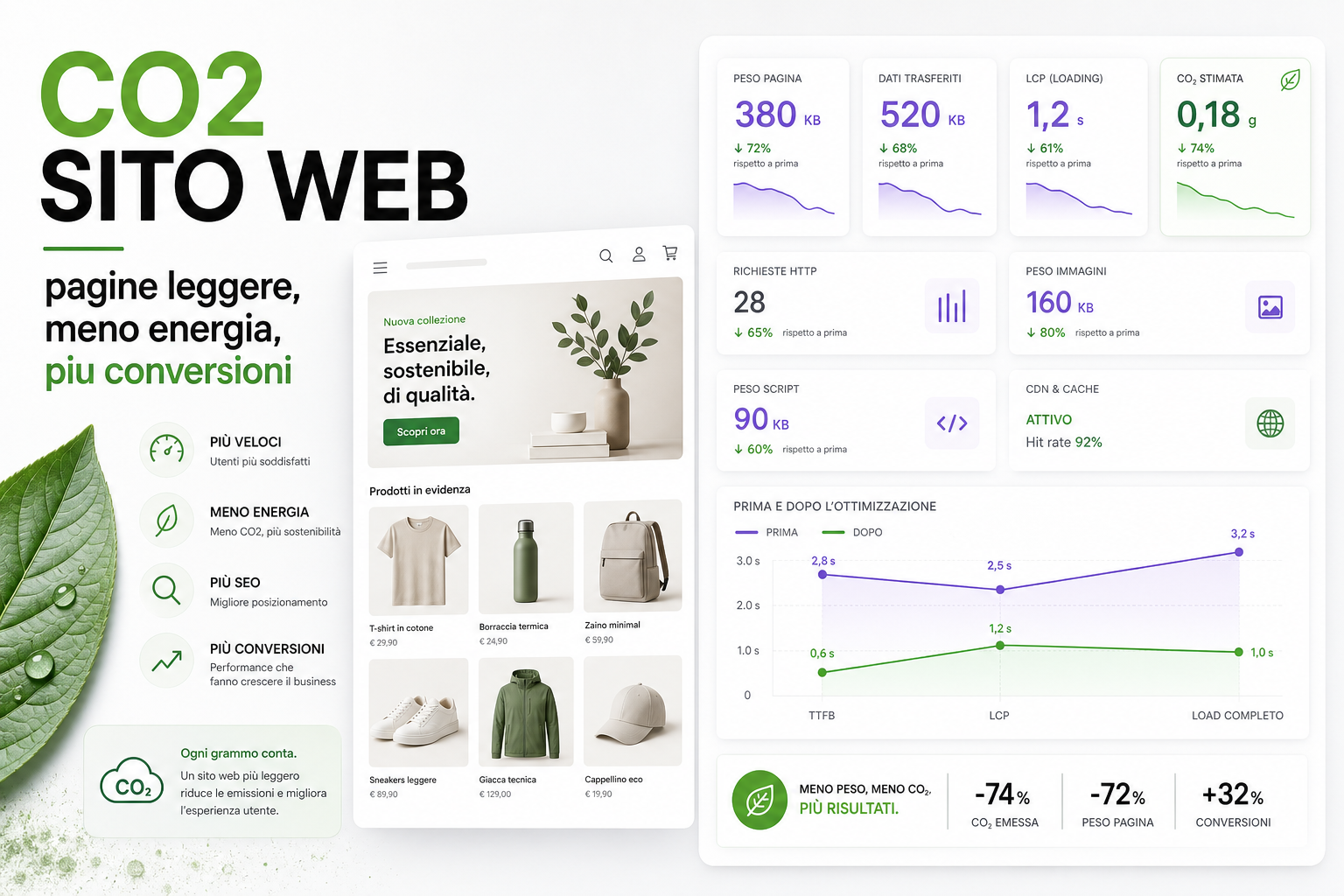
A lighter site isn't just more sustainable. It's also faster, cheaper to serve and often better at converting.
Every page load transfers data: HTML, CSS, JavaScript, images, fonts, video, marketing pixels, API calls, third-party scripts. On an eCommerce site all of that gets multiplied across products, categories, filters, blog, checkout and campaigns.
Less weight means less energy, less waiting, less data usage, less strain on the server and a better experience for the user.
Performance and CO2 are connected
Digital sustainability can't be measured by a score alone. But one thing is clear: heavier pages need more data transfer, more processing and more time.
In practice:
- huge images increase page weight;
- pointless scripts burn CPU and network;
- unoptimised fonts slow down rendering;
- video loaded immediately wastes bandwidth;
- poor caching generates repeated requests;
- slow pages increase abandonment.
Optimising performance and reducing emissions often means doing the same things: stripping out waste.
Why an eCommerce site tends to put on weight
An eCommerce site grows over time. Every department adds something.
- marketing adds pixels and tags;
- design adds animations and video;
- the catalogue adds images and variants;
- customer care adds chat;
- tracking adds events;
- SEO adds content;
- promotions add banners;
- plugins and modules add CSS and JS.
No single change looks serious. A few months later the category page is far too heavy, the product page loads scripts nobody needs, and the checkout drags along code that serves no purpose.
What to actually measure
To know whether a site is light, a single score isn't enough.
- Total page weight.
- Image weight.
- JavaScript weight.
- Number of HTTP requests.
- LCP, INP and CLS.
- Cache hit ratio.
- Server time.
- Third-party scripts loaded.
- Data transferred on mobile.
- Conversion rate by speed or device.
The most interesting figure isn't "how green are we" in the abstract, but where we're wasting weight and time without creating any value.
Images are usually the first thing to fix
On category and product pages, images are usually the heaviest part.
Useful work:
- WebP and AVIF where they suit;
srcsetto serve the right dimensions;- lazy loading below the fold;
- defined
widthandheightattributes; - controlled compression;
- CDN and caching;
- thumbnails that differ from the product zoom image.
We cover this in more technical detail in the article on eCommerce images, WebP, AVIF and srcset.
Marketing scripts: the invisible weight
Many slow sites aren't slow because of the template, but because of third-party scripts.
- Ads pixels;
- analytics;
- heatmaps;
- chat;
- reviews;
- A/B testing;
- pop-ups;
- social widgets;
- consent management.
Every script has to justify itself. If it doesn't drive decisions or sales, all it does is add weight.
Performance that converts
A faster site helps the user do what they came to do: find, compare, add to basket, pay.
The most effective changes are often very concrete:
- categories that open immediately;
- fast filters;
- lightweight product pages;
- a checkout without pointless scripts;
- images that are sharp but not enormous;
- fonts loaded properly;
- caching configured;
- servers and databases that aren't saturated.
Performance isn't just a Lighthouse score. It means less friction.
Green web audit: where to start
A useful audit should identify priorities, not just produce numbers.
- Measure the weight of your key pages.
- Identify images that are too large.
- List third-party scripts.
- Check Core Web Vitals.
- Verify caching and CDN.
- Analyse mobile and slow connections.
- Estimate wasted data transfer.
- Connect performance to conversions.
- Define a plan for cutting weight.
Green web gets interesting when it stops being aesthetics and starts being efficiency.
How we handle this at BitHub
On eCommerce projects we work on code, images, caching, fonts, scripts, servers and UX. The goal is to cut weight without impoverishing the experience.
This connects to our Green Web Audit, the website CO2 and performance calculator, eCommerce Core Web Vitals and custom eCommerce development.
Useful sources
To connect page weight, performance and sustainability we drew on the Sustainable Web Design methodology, the web.dev guides on web performance and the web.dev documentation on Core Web Vitals.
FAQ
Does a lighter site emit less CO2?
Broadly speaking, reducing data transfer, requests and computational work helps cut waste. Estimates vary, but efficiency remains a technical and commercial advantage.
Do I have to remove all my images to be sustainable?
No. An eCommerce site needs images. What it needs is to optimise them, serve them in the right format and load them when they're actually needed.
Is Lighthouse enough to measure performance?
No. Lighthouse is useful, but it needs to sit alongside real-world data, Search Console, CrUX, analytics, server logs and tests on your most important pages.
Do marketing scripts really weigh that much?
Often, yes. Tags, chat, pop-ups, heatmaps and widgets can all affect load time, CPU, consent and page stability.
Are performance and conversions connected?
Yes. Faster pages reduce friction, especially on mobile, category pages, product pages and checkout.
Want to know how heavy your eCommerce site really is?
We can analyse your key pages, weight, Core Web Vitals, images, scripts and estimated CO2 to build a measurable plan for slimming things down.