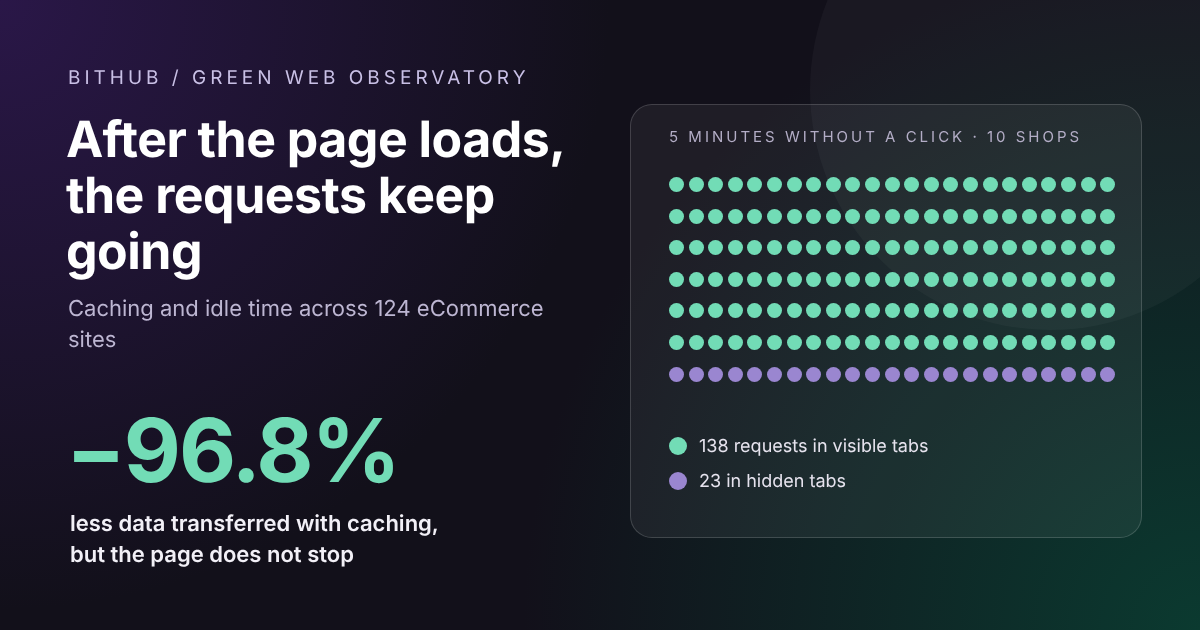
The page has loaded and the visitor has stopped doing anything, yet some HTTP requests keep firing. A BitHub study of 124 eCommerce sites separates the traffic that caching saves from the work that can carry on after the page has loaded.
BitHub Observatory · Exploratory technical research · 27 October 2026
Opening an online shop is not simply a matter of downloading a page. Images, JavaScript, marketing apps, measurement tools and remote services all take part in a sequence that can continue even after the user stops interacting. The question, however, needs to be asked precisely: which activities really carry on, how often, and under what conditions does the browser suspend them?
To answer it we combined two levels of observation. The first is a campaign covering 124 online shops operating in Italy: 253 selected addresses and 2,087 recordings in total across network, CPU, mobile and experimental script tests. The second is a targeted idle test on 15 sites, monitoring network requests for five minutes with visible and hidden tabs. These are not measurements of electricity use, nor a statistically representative sample of Italian eCommerce. They are reproducible data on what Chrome actually observed.
Caching lightens the network load. It does not make the page disappear
The first result is clear-cut. Across 175 URLs belonging to 97 shops, for which at least one usable measurement exists in both conditions, the median data transferred is 4.82 MB on a cold visit and 0.153 MB on a warm visit. Calculating the reduction for each individual URL and taking the median gives −96.8%. Megabytes are decimal and represent the transferred bytes observed by the tool, not the size of the files installed on the server.
One important caveat applies. In the version used, some runs labelled cold could still have been served by a service worker, which changes the experimental meaning of a "cold cache". Excluding every URL where a service worker was seen to intervene leaves 147 URLs from 81 shops: the median is 4.85 MB cold and 0.156 MB warm, a median reduction of 96.7%. Even this filter does not prove the complete absence of every form of caching, but it shows that the overall result does not depend only on the most obvious cases.
The saving is real for the browser's network traffic under these test conditions, not automatically for the CPU or for energy. Even when scripts are cached they may still need to be initialised and executed; the browser can keep building the DOM, calculating layout, rendering dynamic components and starting application requests. The CPU counters in this campaign had methodological problems and were excluded from the conclusions. We therefore cannot say that caching cuts energy use by 96.8%.
JavaScript and inner pages: two points that are often underestimated
Among 177 cold URLs with usable recordings, taking one representative run per URL, scripts account for 44.2% of the bytes attributed to resources, against 34.9% for images. This result is specific to the sample and differs from BitHub's previous survey. It does not mean that "JavaScript uses 44% of the energy": these are different quantities. It does suggest, however, that focusing only on photos and banners can leave a considerable part of the network load untouched.
The home page is just as unrepresentative of the whole shop. Among 19 eCommerce sites with a comparable home page, category page and product page, six have at least one inner page that transfers more than the home page. For example, in the URLs measured for a sporting goods retailer, the product page reaches 5.39 MB against 4.63 MB for the home page; for a clothing chain the category analysed transfers 19.36 MB against 18.39 MB for the home page. These are comparisons between specific pages, not judgements on the overall quality of the shops.
A third exploratory test compared, on 11 sites, an ordinary page load with a variant in which some external services were blocked. Downloaded bytes fell in all 11 pairs; the median reduction is 16.7%, with very wide differences between shops. Each variant was measured once and in a fixed order: the result points to possible technical headroom, but does not demonstrate an isolated causal effect or a CO₂ saving.
Five minutes without a click: what really happens
To check whether communication continues after the page loads, we developed a dedicated observation protocol in Chrome. After 60 seconds of settling time, each page is left without interaction for 300 seconds, with a recording every 30 seconds. We count the HTTP requests started, the method, the destination host and some network events; we do not keep cookies, request bodies or personal identifiers.
The parallel campaign covered 15 eCommerce sites in 12 sectors, with two planned repetitions and two conditions per site: visible tab and hidden tab. That meant 60 sessions were expected. The engine completed 39, each with ten intervals: 390 observations of 30 seconds. The export also contained 30 intervals inherited from an earlier campaign, which were kept separate from the counts presented here.
The most important limitation concerns actual visibility: during the first repetition Chrome reported every tab that should have been visible as hidden. Those sessions were not treated as a valid comparison. In the second repetition both conditions were complete and correctly classified for 10 shops. The comparison below is based on these ten cases, not on all fifteen.
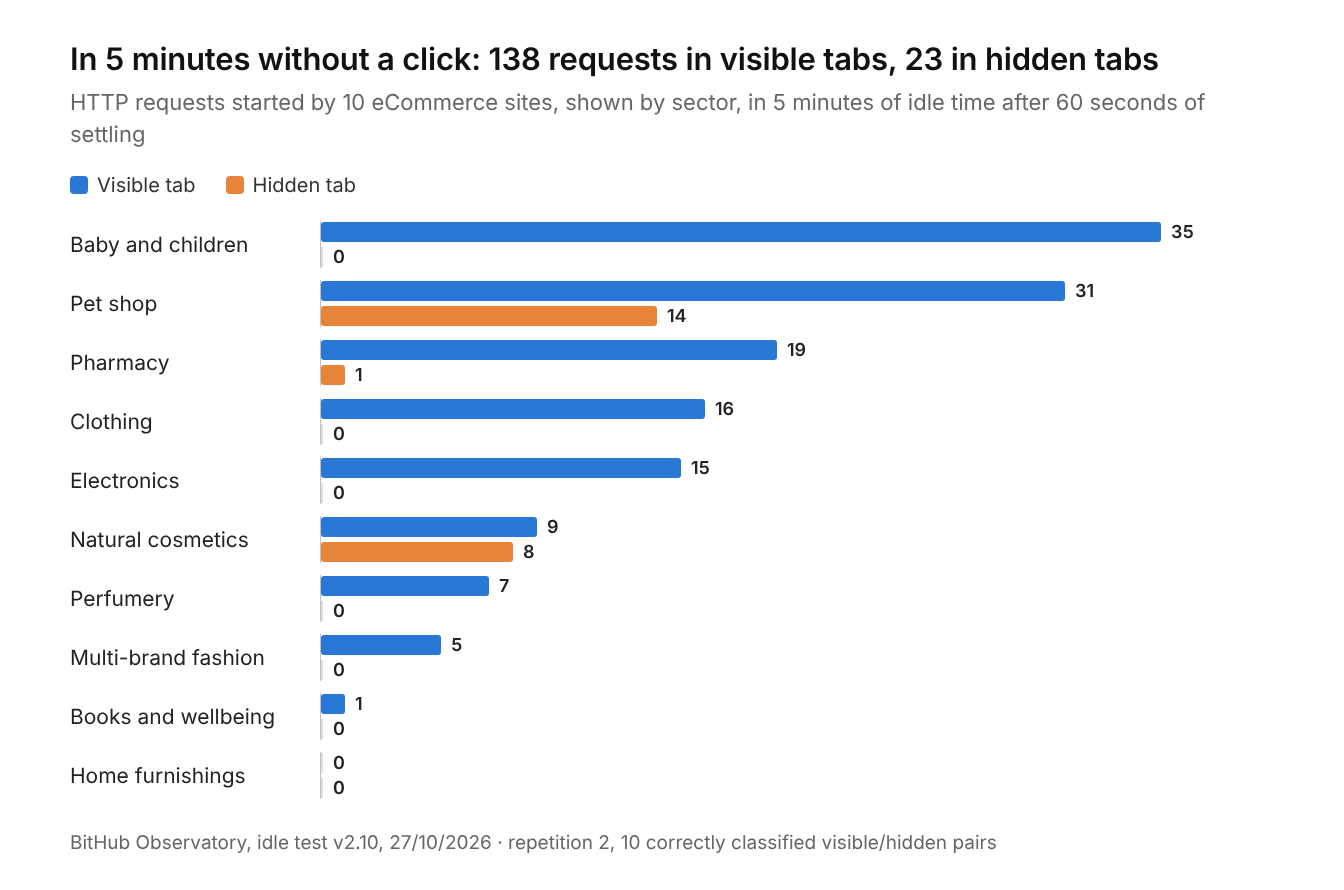
In the ten valid comparisons from the second repetition, during the five minutes without interaction, we observed 138 HTTP requests with the tab visible and 23 with the tab hidden. Nine shops out of ten generated at least one request in the visible condition, three out of ten in the hidden condition. In the second half of the five minutes there were still 65 requests in total in the visible tabs and 11 in the hidden tabs, the latter concentrated in two shops. The figure describes this test, not an average frequency for Italian websites.
Four examples that show the differences
A clothing chain is a case of prolonged activity while the tab stays visible: in the second repetition we counted 16 POST requests to a clarity.ms host during the five idle minutes, seven of them in the second half of the observation. The corresponding hidden tab generated no new requests in the recorded window. The result does not justify claiming that either behaviour is universal: in an earlier test, under different conditions, communication had also been observed with the tab hidden.
An online pet shop kept communicating in both conditions: 31 requests with the tab visible and 14 with the tab hidden. The hosts involved include services attributable to Microsoft Clarity, VTEX and Azure application telemetry. In the second half of the test the hidden tab still started seven requests, not just in the first few seconds after loading.
A natural cosmetics shop showed nine requests with the tab visible and eight with the tab hidden, contacting Microsoft Clarity and Microsoft Advertising hosts. In the second half of the period there were four requests from the hidden tab. It is a useful example of communication observed well beyond the initial loading phase.
A baby and childrenswear retailer shows the opposite behaviour: 35 requests in the visible condition, mostly linked to the Trustpilot review widget, and no requests started in the corresponding hidden window. Not every site behaves the same way, and not all communication is down to analytics: some components can update themselves or fetch content without a click.
These four examples are not a ranking of sustainability or privacy protection. They measure communication attempts observed by the browser, and having many windows open at the same time is a laboratory condition that may affect how pages behave.
"They are sending our data" is a different claim
A browser that is not logged in is not necessarily anonymous: a web request can expose the connection's IP address to the recipient and, depending on the context, cookies, other identifiers, headers and page or event data. Analytics and session recording systems can also link several events to the same session. But we cannot infer the content of a payload from the number of POST requests. Our exports contain methods and hosts, not the data actually transmitted. Some HTTP 204 No Content responses simply mean that the server returned no response body, not that the browser sent no information.
The claim supported by the experiment is therefore this: some eCommerce sites kept generating network requests for several minutes without any interaction, sometimes even with the tab hidden. These data do not show that they transmitted specific personal data, breached consent or transferred large amounts of information. The traffic observed by the browser does not match server-to-server traffic either.
What about AI bots? That is a different part of the problem
Crawler traffic needs to be analysed separately. A browser's cold/warm difference cannot be applied to bots: many crawlers mainly fetch HTML documents, do not execute the page as a real user does and can take advantage of CDN-side caches or conditional responses. The Cloudflare Radar 2025 report estimated that, across the network it observed, AI bots other than Googlebot accounted on average for 4.2% of HTML requests, while Googlebot accounted for 4.5%; these are Cloudflare figures, not BitHub measurements of the shops in the sample.
Quantifying the work that crawlers impose on a single eCommerce site would require access logs, cache hits and misses, the number of requests reaching the origin, application response times and ideally the infrastructure's CPU and energy use. A browser does not provide these data. Likewise, transferred bytes do not allow a direct calculation of the kWh or litres of water used in data centres.
So what should anyone running an eCommerce site do?
The first question is not "how heavy is the home page?" but which pages and which services are doing avoidable work. It is worth looking at categories, product pages, filters and site search; separating essential assets from optional ones; optimising images and JavaScript bundles; and identifying timers, polling and widgets that stay active without adding value for the user. Some updates are indispensable — for sessions, stock availability or real-time features, for example — while others can be paused, spaced out or batched when the page is not visible, carefully testing the effects on reliability and measurement.
The second question concerns the functional unit: bytes per page view, requests per session, server work per search or per completed order. These are different parameters. An intervention is convincing when it reduces an observable technical cost without making accessibility, conversions, reliability or data accuracy worse. Calling a site "green" on the basis of megabytes alone, or a platform "inefficient" because of the language it is written in, would be a leap of logic.
For a first check of your own pages you can use BitHub's free Green Web Audit, which measures page weight, Core Web Vitals and estimated CO₂; our article on website CO₂ and performance explains why lighter pages cost less, and the one on Core Web Vitals covers what matters for the shopper's experience.
The study does not conclude that every eCommerce site keeps sending data forever. Its conclusion is more concrete: the end of page loading does not always coincide with the end of communication, and a warm cache, while hugely reducing transfers, is not enough to describe everything an online shop asks of the browser and the infrastructure. To improve, you first need to know what work continues, why it continues and whether it can be avoided.
Methodological note and limitations of the study
Non-random sample, selected to cover several sectors; data captured in Chrome via the Chrome DevTools Protocol; consent banners handled manually before the tests. In the network campaign, 248 of 253 URLs were eligible for scanning, 175 have a usable cold/warm comparison and 147 make up the conservative subset with no service worker observed. The number of recordings does not equal the number of shops or independent statistical units. Anomalous HTTP results and cases of insufficient quality were excluded. The v2.10 idle test contains 390 intervals produced by 39 sessions, not 60 complete sessions; 10 visible/hidden pairs are comparable in the second repetition. A response from an anti-bot system, even with HTTP 200, should not be treated as a valid commercial page without checking. The "hidden tab" mode may involve timer and activity throttling imposed by Chrome. A five-minute window may not capture events that recur less often. The results do not measure the content of POST requests, the energy used or the behaviour of the average visitor.
Sources and materials
- BitHub Observatory 2026, original exports of 23 and 26 October 2026, V4 and QA technical reports, and Idle v2.8/v2.10 captures of 27 October 2026. Datasets and procedures are available for verification; the QA report identifies exclusions and limitations.
- HTTP Archive, Web Almanac 2025 — Page Weight: external context on page weight, resource types and the difference between home pages and inner pages.
- Cloudflare, Radar 2025 Year in Review: shares of HTML requests attributed to crawlers and AI bots on the Cloudflare network.
- MDN, Page Visibility API: how tab visibility is handled and background execution limits.
Frequently asked questions about caching and requests after page load
Does caching reduce an eCommerce site's energy use?
We did not measure that. In the sample, caching reduced the data transferred over the network by a median of 96.8%, but cached scripts still have to be initialised and executed, and the campaign's CPU counters were excluded from the conclusions because of methodological problems.
Can an eCommerce site keep sending requests while I am not using it?
Yes. In the ten valid comparisons of the test, nine shops out of ten started at least one HTTP request during five minutes without interaction with the tab visible, and three out of ten did so with the tab hidden too. The causes observed range from analytics and session recording to review widgets and application services.
Do these requests mean the site is sending my personal data?
The test does not show that: we recorded methods and destination hosts, not the content of the requests. Every request can, however, expose the connection's IP address to the recipient and, depending on the context, cookies and other identifiers.
Is measuring the home page enough to know how heavy an eCommerce site is?
No. Among 19 shops with a comparable home page, category page and product page, six had at least one inner page that transferred more data than the home page.