An eCommerce migration does not improve SEO simply because the technology changes. It can create an advantage when the new platform removes structural constraints, makes categories and filters governable, cuts response times and correctly preserves URLs, content and the signals already earned.
In this project we started from a PrestaShop store that was already highly visible, but had become hard to optimise for what the catalogue needed. We first worked on the existing platform; then, once the cost of its constraints outweighed the benefit of further fixes, we planned the move to a custom system.
The starting point
The site had a large catalogue, many indexed pages and organic traffic worth protecting. The main risk was not only technical: a migration without a URL inventory could have lost pages, internal links and queries built up over years.
There were four critical areas:
- performance limited by the architecture, the theme and accumulated components;
- difficulty in creating selected, genuinely curated filter pages;
- an inflexible structure for categories, brands and products;
- the rising cost of the customisations the business needed.
Phase one: optimising PrestaShop
Before proposing a migration we checked how much could be recovered on the existing platform. Work on caching, queries, images, assets and configuration took the Lighthouse score of the test we observed from around 20 to around 65.
This step matters: changing platform should not be the automatic answer to a slow site. Many PrestaShop stores can improve by working on the theme, modules, database, hosting and code. Our guide on a slow PrestaShop explains how to tell fixable problems from limits that have become structural.
In our case, optimisation improved the situation but did not remove the complexity involved in evolving the catalogue and the SEO. That is where the custom solution became a design decision rather than a slogan.
Phase two: designing the new eCommerce
The custom platform was built around the real processes: products, categories, brands, filters, content and integrations. The work included:
- rendering and caching designed to cut response times;
- consistent templates for titles, H1s, canonicals and structured data;
- editorial control over categories, brands and filter pages;
- indexing control to avoid pointless combinations;
- sitemaps generated from the structure that is actually indexable;
- redirects governed by a verifiable map;
- monitoring of errors, performance and coverage after go-live.
In lab tests run on the new system, Lighthouse reached values close to 98. That is a useful figure for comparing implementations, but it should not be read as a guarantee of rankings or conversions. Real results also depend on devices, networks, third-party scripts, content and user behaviour.
Indexable filters without creating chaos
One of the main benefits was being able to turn certain combinations of category, brand and attributes into real editorial pages. Not every filter needs to be indexed. A page deserves visibility when it answers a real question, contains coherent products, has a stable URL, a specific title, useful copy and internal links.
The system makes it possible to select those combinations and leave the rest as plain navigation. That avoids multiplying thousands of near-duplicate URLs. Our guide on eCommerce facets and SEO describes the criteria we use to decide which pages to open up to search engines.
URLs and redirects: the most delicate part
Short URLs are not automatically better. The advantage comes from stability, readability and a structure that can be maintained over time. During the migration we built an inventory of the previous URLs and a one-to-one destination map.
The checks included:
- 301 redirects with no chains and no generic destinations;
- canonicals consistent with the new URLs;
- no accidental blocks in robots.txt or meta robots;
- a sitemap updated with canonical URLs only;
- preservation of titles, content and useful internal links;
- checks on 404s, soft 404s and orphan pages;
- annotations in Analytics and monitoring in Search Console.
For the full process it is worth using our eCommerce SEO migration checklist before go-live, not after you have spotted the drop.
Observed results
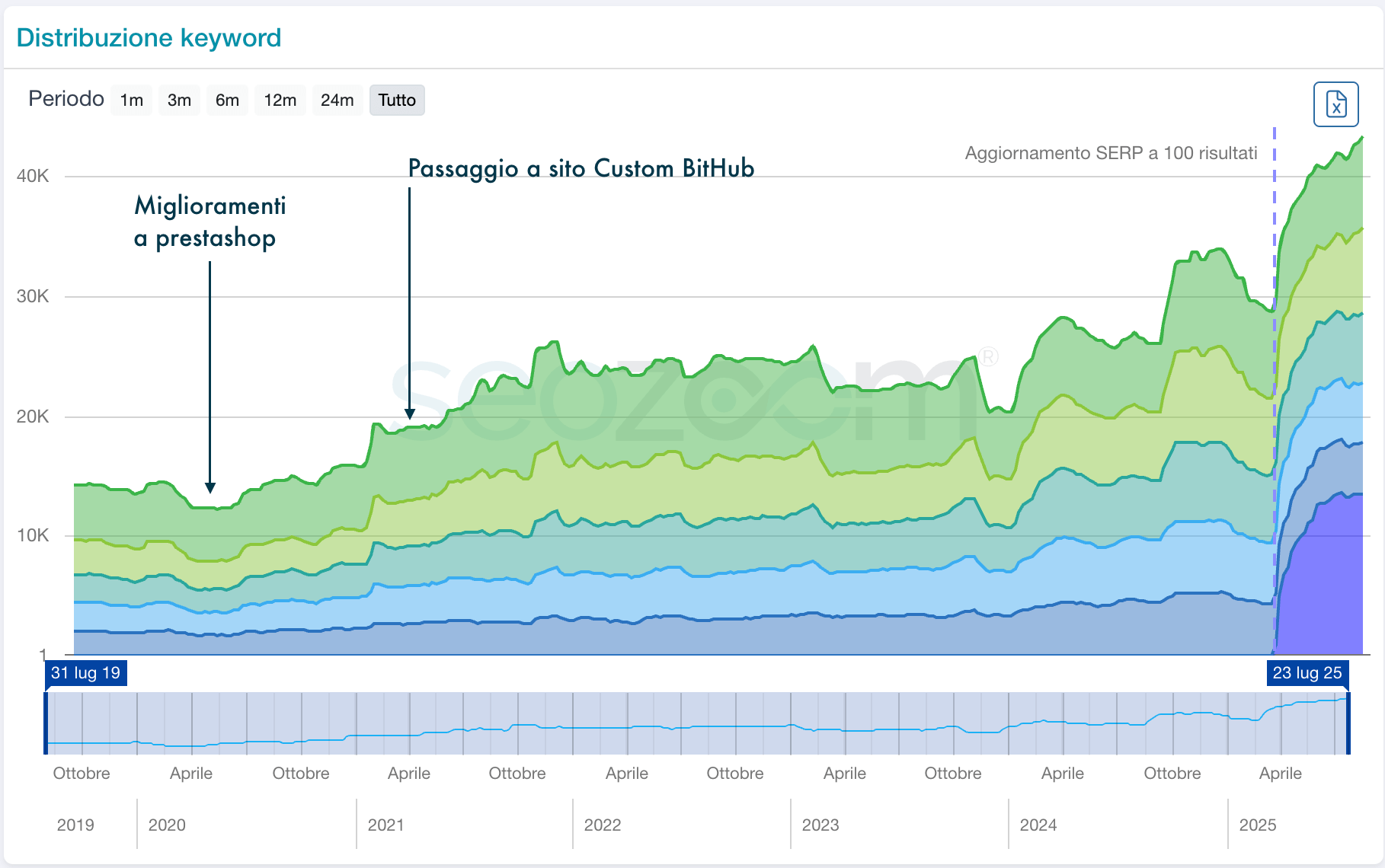
After the migration, the number of keywords detected by SEO tools showed steady growth, despite part of the catalogue being rationalised. The chart below documents the observed trend:
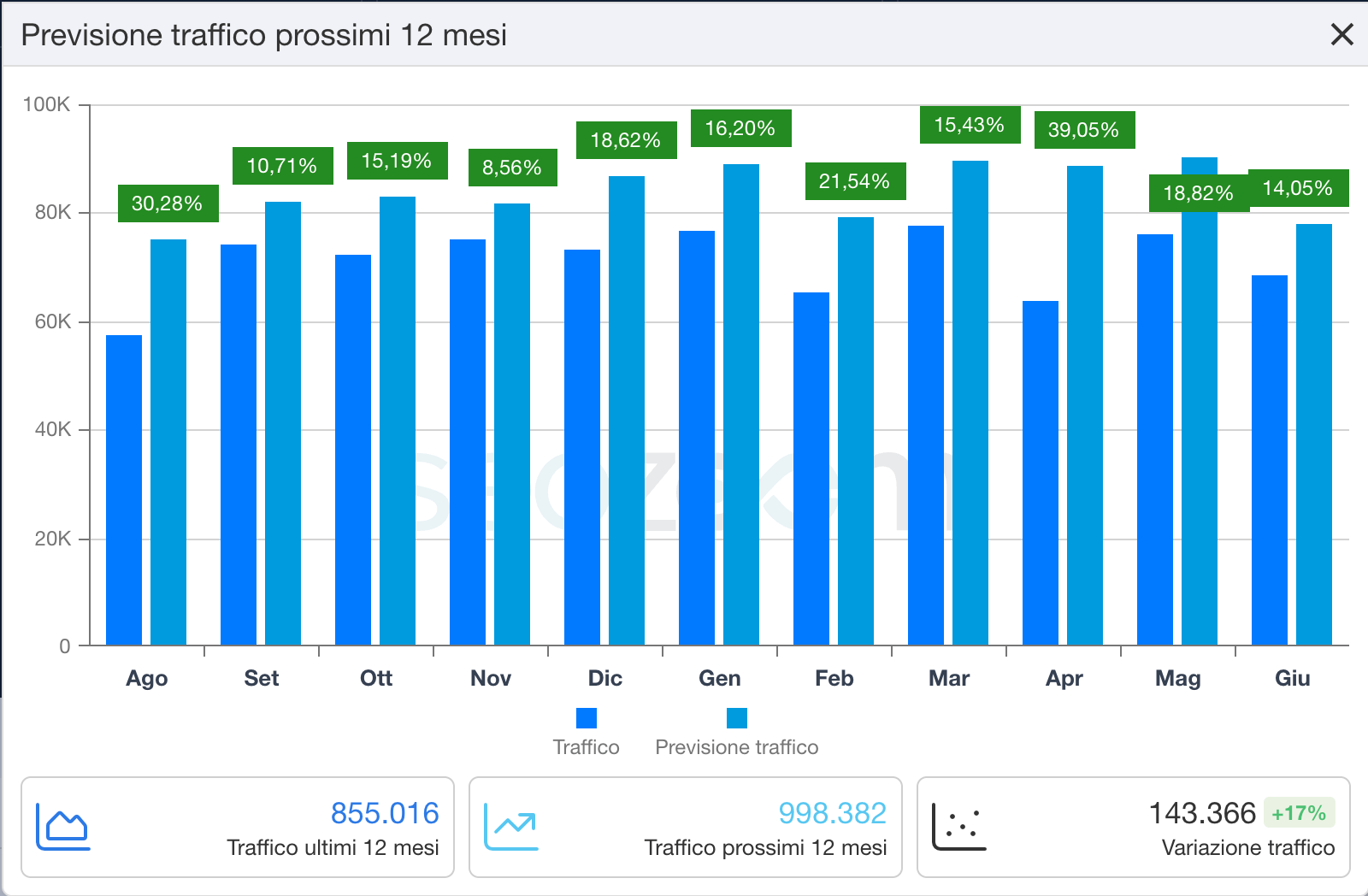
SEOZoom also showed a forecast of 17% organic traffic growth, from around 855,000 to almost one million visits. A tool's forecast is not a result already achieved: it depends on rankings, estimated volumes and future performance. We report it as a forward-looking indicator, kept separate from the data already observed.
What cannot be credited to the platform alone
SEO growth after a release can depend on several factors: technical structure, content, product range, demand, backlinks, seasonality and search engine updates. That is why it is not correct to claim that moving to custom automatically produces more traffic.
The more defensible outcome is a different one: the new platform made possible work that was previously expensive or fragile, improved technical performance and allowed SEO pages and the migration itself to be governed with far more precision.
When a custom platform is genuinely worth it
Custom makes sense when processes and catalogue genuinely differentiate the company, when integrations are central and when the limits of a standard platform generate a recurring cost. It is not the right choice for a small, standard catalogue that can work perfectly well on WooCommerce, PrestaShop or Shopify.
Our page on custom eCommerce development describes the cases in which we design a dedicated platform and the ones in which we prefer to optimise what already exists.
Frequently asked questions
Does moving from PrestaShop to a custom eCommerce always improve SEO?
No. Custom only helps if it solves real constraints and the migration preserves URLs, content, structured data, internal linking and technical signals. A new platform with no plan can make visibility worse.
Does the Lighthouse score determine rankings?
No. Lighthouse is a lab measurement that is useful for diagnosing problems. Content, intent, authority, crawling and real user data remain fundamental.
How do you avoid losing traffic during a migration?
You need a URL inventory, a one-to-one redirect map, checks on canonicals, sitemaps, robots, content, internal links and analytics, plus monitoring after go-live.
When is it better to optimise PrestaShop instead of migrating?
When the problems come from the theme, modules, queries, caching or hosting and can be solved without changing platform. Migration is worth considering when structural constraints keep generating costs and slowdowns.
Let's assess whether your eCommerce needs optimisation or migration