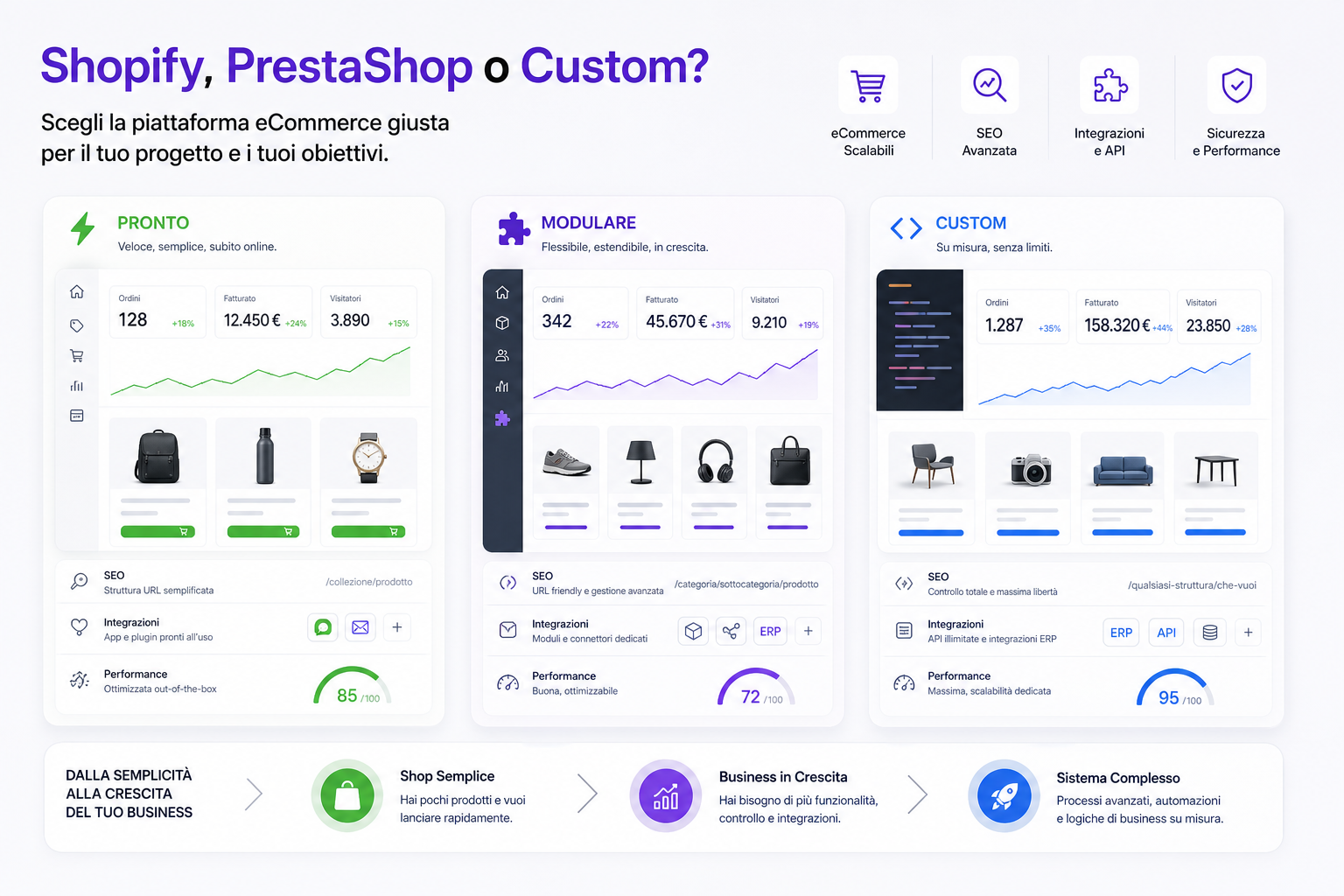
The question is not "which is the best eCommerce platform?". The real question is: which platform will hold up your business model over the next few years?
Shopify can be excellent for launching quickly, selling on a hosted system and removing part of the technical complexity. PrestaShop can work well for anyone who wants more control over the code, a classic eCommerce catalogue and a customisable open source base. A custom platform can make sense when the site is no longer just an online shop, but a system connected to SEO, catalogue, ERP systems, feeds, price lists, AI, customer care and internal processes.
The problem starts when the platform is chosen by looking only at the initial cost or how fast you can go live. A small eCommerce needs simplicity. A growing eCommerce needs control. And somewhere between simplicity and control is the point where a standard platform gets too tight.
There is no perfect platform for everyone
Every platform carries a philosophy with it.
- Shopify tends to simplify infrastructure, checkout, basic catalogue management and the app marketplace.
- PrestaShop offers more technical control and open source eCommerce logic, but demands more attention on hosting, modules, updates and performance.
- Custom lets you build around the business, but it requires investment, design work, maintenance and a solid technical partner.
The point is not to cheer for a technology. The point is to understand how complex your catalogue is, how important SEO and Google Ads are, how many integrations you have, how much performance and automation matter, and how much hidden cost you are piling up through workarounds, apps, modules and manual processes.
When Shopify is a good choice
Shopify is often attractive when you want to start quickly, with managed infrastructure and a broad ecosystem.
It can work well if:
- you have a simple or medium-sized catalogue;
- you want to reduce server management, updates and hosting;
- you don't need very unusual catalogue logic;
- you are happy to work within the platform's rules;
- you want to use off-the-shelf apps for many functions;
- the priority is selling soon, not designing everything from scratch;
- the internal team wants a simple back office.
Shopify today offers useful tools such as custom fields, taxonomy, product management, redirects and apps that extend many functions. For many D2C brands, shops with tidy catalogues and projects that need to launch quickly, it can be a sensible choice.
The limit shows up when you start saying, often: "Shopify doesn't handle this the way we need". At that point every requirement turns into an app, a workaround, a script, an expensive customisation, or something you give up on.
Where Shopify can get too tight
Shopify is not weak because it is simple. It is strong precisely because it simplifies. But simplification has a price once the business becomes more specific.
The critical points can be:
- URL structures and SEO logic that are less free than in a system designed to measure;
- facets and faceted pages that need care so they don't create pointless or non-indexable pages;
- dependency on third-party apps for advanced functions;
- recurring costs that grow with apps, plans and connected services;
- complex customisations on checkout, price lists, B2B, integrations and internal flows;
- difficulty modelling certain catalogue, feed or SEO logic exactly;
- lock-in: changing platform in the future means a real migration.
That does not mean Shopify is the wrong answer. It means it should be chosen deliberately: excellent when its constraints match the project, less suitable when the business needs deep freedom.
When PrestaShop is a good choice
PrestaShop was built for eCommerce and can be a good choice when you want a platform you can control more directly, installed on your own hosting or on hosting managed by your supplier, with more direct access to code, modules and database.
It can work well if:
- you have a classic eCommerce catalogue with categories, products, attributes and variants;
- you want more freedom than a hosted platform allows;
- you have a team or a supplier able to handle hosting, updates and modules;
- you need a modular base with many available extensions;
- you want to customise theme and features with more technical access;
- you have multistore needs or traditional eCommerce configurations.
PrestaShop can be a good compromise between a ready-made platform and control. But the compromise only works if it is properly maintained.
Where PrestaShop can get too tight
PrestaShop tends to become problematic when it grows in layers: one module for facets, one for the feed, one for checkout, one for reviews, one for promotions, one for the cookie banner, one for tracking, one for the ERP integration.
After a few years, many shops are no longer "a PrestaShop". They are a collection of modules, customisations, overrides, a modified theme, cron jobs, scripts and patches. At that point every update becomes delicate and every new feature can break something.
The typical signals are:
- slow pages despite caching and more powerful hosting;
- a fragile checkout, or one crowded with modules that interact badly;
- facets that generate messy URLs or useless pages;
- a Merchant Center feed that is hard to govern;
- a back office that slows down whoever manages catalogue and orders;
- updates postponed for fear of incompatibilities;
- modules that are no longer maintained, or built by different suppliers;
- ERP integrations built as patches rather than as a stable flow.
We covered this in our guide on a slow PrestaShop, performance, SEO and Google Ads. The problem is not PrestaShop itself: it is the technical cost that appears when the platform is stretched beyond its natural shape.
When a custom eCommerce platform makes sense
A custom platform is not for everyone. If you need to sell a handful of products, launch fast or validate a market, a standard solution is usually more sensible.
Custom becomes interesting when eCommerce is a central part of the business and has requirements you no longer want to bend around plugins or apps.
It is worth considering when:
- the catalogue is large, complex or full of specific rules;
- facets need to become real SEO pages, with short URLs and dedicated content;
- you have to connect ERP, management software, warehouse, CRM, price lists or sales agents;
- you have B2B logic, reserved pricing, customer roles, discounts and advanced commercial terms;
- the Google Merchant Center feed needs surgical control;
- Google Ads has to work on margins, custom labels, availability and real orders;
- you want to use AI on the catalogue, product pages, FAQs, site search and customer care;
- performance is a requirement, not an optional extra;
- every month you are spending too much on workarounds and maintenance.
In these cases custom is not "building the site from scratch because it looks nicer". It is designing a system that follows business processes instead of forcing the company to follow the software's limits.
SEO: the difference shows in URLs, facets and structure
For an eCommerce, SEO is not just a blog and some titles. It is architecture.
The platform has to handle well:
- main categories;
- brand pages;
- facets that are indexable only when useful;
- canonicals;
- product variants;
- out-of-stock products;
- sitemaps;
- 301 redirects;
- internal linking;
- structured data;
- mobile performance.
The facet question is decisive. In many eCommerce sites, facets generate URLs with parameters, endless combinations or pages Google should never see. In a well-designed system, on the other hand, some facets can become genuine SEO pages: clean URLs, a dedicated title, a specific H1, useful copy, FAQs, relevant products and a coherent canonical.
We covered this in our guides on which eCommerce facets to index, eCommerce sitemaps for products, categories and facets and eCommerce canonicals.
Integrations: when eCommerce has to talk to the rest of the company
A mature eCommerce does not live on its own. It has to talk to external systems.
For example:
- management software for orders, invoices and customers;
- warehouse and availability;
- ERP for price lists and commercial logic;
- CRM for segments and customer care;
- the Google Merchant Center feed;
- Meta catalogue;
- marketplaces;
- newsletters and automations;
- AI chatbots and site search;
- shipping and tracking systems.
As long as the integrations are simple, apps and modules can be enough. But when data has to be consistent, synchronised, controlled and enriched, you need more solid design.
This is where an eCommerce integrated with your ERP or a custom eCommerce platform can change the way the company works.
Costs: the initial price is not the real cost
When you compare platforms, the initial cost is only part of the story.
The real cost includes:
- initial setup;
- hosting or platform plan;
- apps, modules and recurring licences;
- commissions or transaction costs where they apply;
- technical maintenance;
- updates and security;
- internal time spent managing catalogue and orders;
- the cost of workarounds;
- the impact on SEO and future migrations;
- conversions lost to slowness or friction;
- Ads budget wasted on weak data or weak landing pages.
A platform that is cheap at the start can become expensive if every requirement needs an add-on. A custom platform costs more up front, but it can reduce friction and operating costs if the business is complex enough to justify it.
Quick table: Shopify, PrestaShop or custom
| Requirement | Shopify | PrestaShop | Custom |
|---|---|---|---|
| Launching quickly | Very strong | Good | Less suitable |
| Technical control | Limited by platform constraints | Good, but depends on modules and theme | Maximum, if designed well |
| Advanced SEO on facets and URLs | Possible, but with constraints | Possible, but often module-based | Can be designed to measure |
| Complex ERP/CRM integrations | Often via apps or connectors | Possible with modules or development | Natural if planned into the architecture |
| Performance | Good hosted baseline | Variable: hosting, theme and modules matter a lot | Can be optimised for the real project |
| Recurring costs | Plan + apps + services | Hosting + modules + maintenance | Maintenance and ongoing development |
Signs that your platform has become too tight
If you recognise several of these signals, perhaps the problem is not "a missing module". Perhaps it is a platform that no longer follows the business.
- Every new feature needs an app or a module.
- The site is slow, but nobody can genuinely strip weight out of it.
- SEO facets can't become the pages you would need.
- The Google Shopping feed needs constant fixing.
- The ERP doesn't sync prices, stock or orders properly.
- The back office wastes the team's time.
- Site search doesn't understand synonyms, typos and real intent.
- Ads campaigns receive poor data, or data not linked to margin.
- Customer care keeps answering the same questions because the site doesn't handle them.
- The site can't take advantage of AI, automation and cataloguing without patches.
- You are afraid to update because something might break.
- You pay for maintenance, but you don't feel the system is actually improving.
Before changing platform: watch out for the SEO migration
Changing eCommerce platform is one of the most delicate operations for SEO. Rebuilding the site and publishing it is not enough.
Before go-live you need:
- a complete export of the current URLs;
- a 301 redirect map;
- a check on the pages that bring traffic and revenue;
- mapping of categories, products, brands and facet pages;
- canonicals and sitemaps ready;
- GA4, Ads and Merchant Center tracking verified;
- a Search Console monitoring plan;
- a rollback or rapid-fix plan.
This is not something you improvise. We have written a dedicated guide to the checklist for changing eCommerce without losing Google traffic and a practical case study on the SEO migration of a heavily indexed eCommerce.
What to ask your agency before choosing
Before signing up for Shopify, PrestaShop, custom or anything else, ask these questions.
- Why is this platform right for my business model?
- What limits will I hit in two years if the catalogue grows?
- How will we manage URLs, facets, canonicals and sitemaps?
- How will the ERP, warehouse, CRM and feed be connected?
- Which features will depend on external apps or modules?
- What recurring costs should I budget for?
- How will we handle mobile performance and checkout?
- How will data reach Google Ads and Merchant Center?
- Who will look after security, updates and backups?
- How will a future migration be handled?
- Who owns the code, the data, the accounts and the configurations?
- Which parts of the project are standard and which are genuinely bespoke?
If the only answer is "this platform is the best", the analysis is still missing. A platform is only good if it solves your specific problem.
How we handle it at BitHub
At BitHub we don't start from the technology. We start from the catalogue, the processes, the SEO, the integrations and the numbers.
Our path usually looks like this:
- analysis of the platform's current state;
- a map of technical, SEO and operational limits;
- an assessment of whether to optimise what exists or migrate;
- design of URLs, categories, facets and content;
- an integration plan for ERP, CRM, feeds and Ads;
- data migration, redirects and SEO monitoring;
- development of custom features only where they are genuinely needed;
- AI automation for catalogue, site search, product pages and customer care.
If Shopify or PrestaShop are enough, it makes sense to say so. If instead the site has become a sum of constraints, then a custom platform can be a more rational investment than another three years of patches.
Our position is clear: bespoke eCommerce development, custom platforms, ERP integration, plus SEO and Google Ads working on the same data.
Useful sources
To go deeper on the technical side it is worth starting from the official Shopify documentation on product management, metafields and custom data and URL redirects; from the PrestaShop documentation on modules and hooks and the webservice; and from Google's guidelines on site moves with URL changes and faceted navigation.
FAQ
Is Shopify better than PrestaShop?
It depends on the project. Shopify is often simpler to launch and manage as a hosted platform. PrestaShop offers more technical control and is open source, but needs more maintenance. The choice depends on catalogue, SEO, integrations, budget and the skills available.
When is it worth moving to a custom eCommerce?
When the standard platform limits SEO, catalogue, facets, integrations, performance, B2B, feeds or internal processes. Custom makes sense if it solves real problems and reduces hidden costs, not simply because "it's more customised".
Does a custom eCommerce always cost more?
It usually requires a larger initial investment. But the real cost has to be compared against apps, modules, maintenance, workarounds, performance, team time and missed opportunities. On complex projects it can become more sustainable over the medium term.
Is Shopify good for SEO?
It can be fine for many projects, but it has structural constraints. If your SEO depends heavily on URLs, facets, categories, brands, faceted pages and custom logic, you need to check carefully whether the platform's constraints are compatible with the strategy.
Is PrestaShop suitable for large catalogues?
It can handle sizeable catalogues, but performance, hosting, theme, modules and database become decisive. When the catalogue grows badly or modules pile up, the system can become slow and fragile.
Can I migrate without losing Google traffic?
Yes, but only with a controlled migration: URL export, redirect map, canonicals, sitemap, tracking, Search Console and post-launch monitoring. The biggest risk is spotting the mistakes after publication.
Want to know whether your platform is holding you back?
We can analyse catalogue, SEO, performance, feeds, checkout, integrations and hidden costs. Not to change platform at all costs, but to understand whether the eCommerce can grow where it is or whether something more solid needs designing.