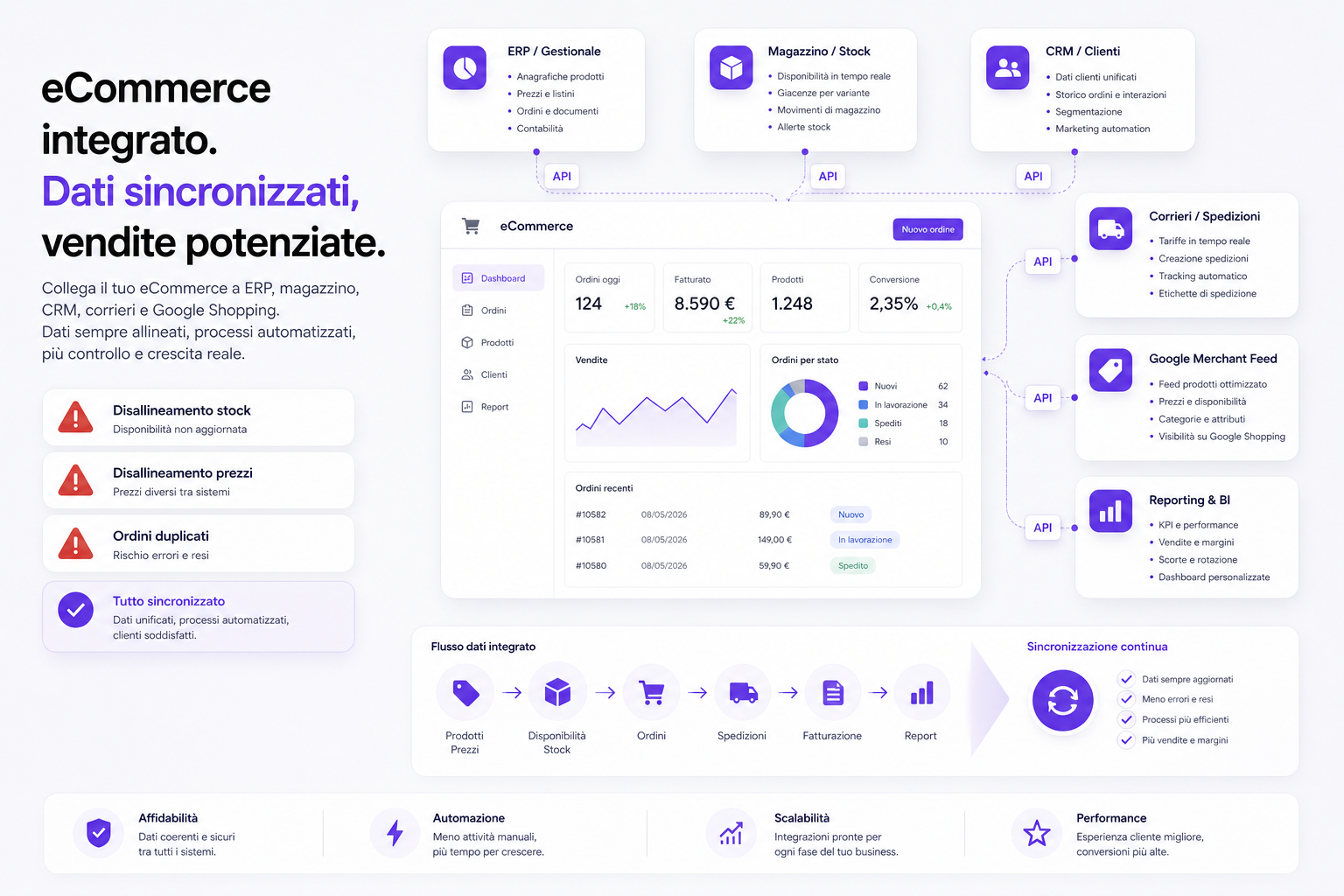
The real problem with many eCommerce sites isn't the design. It is all the hidden manual work going on behind the scenes. Prices updated by hand, stock levels that differ between site and warehouse, orders retyped into the ERP, Google Shopping feeds out of alignment, B2B customers managed outside the platform, and reports that don't reconcile with the accounts.
At first it feels manageable. Two orders a day, a handful of products, a spreadsheet, one person checking things. Then the catalogue grows, Google Ads campaigns arrive, channels and marketplaces multiply, and you add couriers, discounts, price lists, variants and business customers. At that point every manual process becomes a risk.
An eCommerce site integrated with an ERP, management software, CRM and warehouse isn't just about "passing data around". It is about avoiding mistakes that cost money: selling products you don't have, showing the wrong prices, duplicating orders, shipping late, sending inconsistent feeds to Merchant Center, and leaving marketing and finance working from different numbers.
When integration becomes necessary
Not every eCommerce site needs a complex integration from day one. But there are very clear signals.
- Stock on the site doesn't match the ERP.
- Orders are copied over by hand.
- Prices change in the ERP but reach the site late.
- The team frequently has to correct availability, variants or price lists.
- The Google Merchant Center feed has disapproved products or inconsistent data.
- B2B customers have different prices, discounts or terms.
- There are several warehouses or physical stores.
- Couriers are handled outside the order flow.
- The CRM doesn't know what the customer actually bought.
- The Ads, site and ERP reports don't tell the same story.
When these problems keep recurring, another spreadsheet won't help. You need to design the data flow.
The first question: which system owns the data?
Every serious integration starts from a simple question: which is the authoritative system for each piece of information?
For example:
- the ERP owns prices, price lists and invoices;
- the warehouse owns availability and locations;
- the eCommerce site owns SEO content, images, filters and product pages;
- the CRM owns customer statuses, segments and commercial history;
- the shipping system owns tracking, labels and delivery statuses;
- the feed owns how product data reaches Google Merchant Center.
If you don't decide who is in charge, every system tries to correct the others. And when two systems correct each other with no rules, chaos follows: prices reverting, availability overwritten, duplicate orders, products deactivated by mistake.
APIs, files, database or middleware?
An integration can be built in different ways. There is no single right method for everyone.
- APIs: ideal when the systems expose reliable endpoints and you need controlled data exchange.
- Webhooks: useful when you want to react to events, for example a new order, a payment or a stock update.
- CSV/XML files: still valid when the ERP is old or offers no modern API, provided the flow is controlled.
- Database: possible in some contexts, but to be used with caution for reasons of security, consistency and responsibility.
- Middleware: useful when there are many systems to connect and you need a central point for transformation, logging and control.
The choice depends on volume, frequency, risk, data quality, available systems and the supplier's skills. A quickly installed plugin can be enough for a simple flow. It isn't enough when you have to govern orders, returns, stock, price lists, feeds, customers and automations.
Stock: the wrong number ruins sales and trust
Availability is one of the most delicate pieces of data on an eCommerce site.
If you show a sold-out product as available, you sell something you can't deliver. If you show an available product as out of stock, you lose sales. If the Google Shopping feed sends Google an availability different from the site's, you risk disapprovals, inconsistent ads and wasted budget.
Stock isn't just a number. It can include:
- sellable availability;
- quantity committed to unfulfilled orders;
- safety stock;
- incoming goods;
- reserved goods;
- damaged goods or goods in quality control;
- different warehouses;
- physical stores;
- dropshipping suppliers;
- restocking lead times.
Shopify, for example, distinguishes inventory states in its documentation such as available, committed, reserved, damaged, safety stock and quality control. The point isn't that you must use Shopify: the point is understanding that "stock on hand" is too simple a phrase for a process that can be far more layered.
Prices and price lists: the problem isn't just updating the price
Many people think of price integration as a trivial sync: the ERP sends the price, the site displays it. In reality plenty of rules usually come into play.
- prices with or without VAT;
- B2B and B2C price lists;
- prices by customer or customer group;
- volume discounts;
- temporary promotions;
- net and gross prices;
- different currencies;
- minimum margins;
- products excluded from coupons;
- the prices to show in the Merchant Center feed.
If this data isn't consistent, the damage spreads everywhere: a confused customer, a disputed order, a burnt margin, Ads campaigns promoting the wrong products, and an internal team forced to check everything by hand.
Orders: the flow has to be designed before the errors happen
An order isn't just "name, products and total". It can pass through many states:
- created;
- paid;
- awaiting bank transfer;
- to be verified;
- being prepared;
- shipped;
- partially shipped;
- cancelled;
- returned;
- refunded;
- invoiced.
The integration has to decide what happens in each state. When does the order enter the ERP? When is stock decremented? When is the invoice generated? What happens if payment fails? How is a partial refund handled? Who updates the customer? Which system sends the tracking?
If these rules aren't written down, errors decide them for you. And in eCommerce, errors turn into negative reviews, tickets and lost margin.
Merchant Center feed: if the data is dirty, Google Ads works worse
Google Merchant Center requires accurate, correctly formatted product data. Title, description, ID, price, availability, images, GTIN, variants and categories all have to be consistent with the site.
If the feed pulls old or incomplete data from the ERP, Shopping and Performance Max start off badly too.
Examples:
- a product available in the feed but sold out on the site;
- a different price in the ad and on the page;
- variants without a correct
item_group_id; - out-of-date images;
- incorrect Google categories;
- custom labels not aligned with margin, stock or seasonality;
- products suspended because of inconsistent data.
We went into these problems in the article on Google Merchant Center feed errors and in the one on Google Shopping custom labels. The point is always the same: marketing works better when the operational data is reliable.
Real time or batch? Not everything has to update the same way
A mature integration doesn't push everything in real time just because it sounds modern.
Some data needs fast updates:
- critical stock;
- paid orders;
- shipping statuses;
- promotional prices;
- products that have just sold out;
- payment or fulfilment errors.
Other data can be updated in controlled batches:
- long descriptions;
- additional images;
- SEO content;
- non-critical attributes;
- historical reports;
- non-urgent marketing segments.
The right question isn't "real time, yes or no?". The question is: how much does wrong data cost for five minutes, an hour or a day?
Logs, retries and alerts: the integration has to say when it fails
An integration without logs is a black box. As long as it works, nobody looks at it. When it fails, nobody knows what happened.
A serious system needs:
- readable logs;
- IDs for the synchronised events;
- automatic retries for temporary errors;
- alerts for critical errors;
- a status dashboard;
- a history of changes;
- duplicate checking;
- procedures for realigning the data;
- documentation for the team.
The real difference isn't just getting an order through. It is knowing what happens when an order doesn't get through.
When the plugin isn't enough any more
A plugin can be perfect for a simple integration. But it becomes fragile once the company has rules of its own.
Typical signals:
- the plugin covers 80% of the flow and the remaining 20% is handled by hand;
- every plugin update is frightening;
- the logs are hard to read;
- you can't change the synchronisation rules;
- the ERP uses non-standard fields or logic;
- there are several warehouses, price lists, sales agents or channels;
- you also need to connect Ads, CRM, newsletters or customer care;
- the company is growing faster than the connector.
It is the same reasoning as in the article on Shopify, PrestaShop or custom: a standard solution is useful until its constraints become the main cost.
What to ask your agency or developer
Before integrating eCommerce and ERP, ask for precise answers.
- Which system owns products, prices, stock, customers and orders?
- Which data has to be real time and which can be batch?
- How do we handle errors, retries and notifications?
- How do we avoid duplicate orders?
- How do we deal with returns, refunds and cancellations?
- How are B2B price lists and discounts synchronised?
- How do we handle multiple warehouses or safety stock?
- Does the Merchant Center feed use data consistent with the site and the ERP?
- How do we document the flows?
- Who can read the logs when something doesn't add up?
- Is there a realignment procedure?
- What happens if the ERP or the API doesn't respond?
If the answer is "the plugin takes care of it", ask to see the logs, the edge cases and who is responsible for the data. That is where you find out whether the integration is a project or just a promise.
How we handle it at BitHub
At BitHub we treat integration as part of the commercial architecture of the eCommerce site.
Our work can include:
- mapping the existing systems;
- analysing the available APIs, files, web services, databases or middleware;
- defining the authoritative system for each piece of data;
- designing flows for products, stock, prices, orders, customers and shipments;
- logs, alerts, retries and duplicate checking;
- a Merchant Center feed connected to reliable data;
- integration with CRM, newsletters, Google Ads and reporting;
- custom development when plugins and connectors aren't enough;
- documentation for whoever runs the system.
This connects directly to our pages on eCommerce integrated with the ERP, custom eCommerce development and bespoke eCommerce development.
The goal isn't connecting systems because "it looks modern". It is removing errors, reducing manual work and giving SEO, Ads, customer care and finance the same reliable data.
Useful sources
For the technical side, we checked the Google documentation on the Merchant Center product data specification, the Shopify documentation on inventory management apps, the Shopify GraphQL Admin API for inventory items, and the PrestaShop documentation on the Webservice API.
FAQs
Do you absolutely need an API to integrate eCommerce and ERP?
No. APIs are often the best route, but they aren't always available. You can also work with CSV/XML files, databases, web services or middleware, provided there are checks, logs and clear rules.
Does synchronisation always have to be real time?
No. Critical stock, orders and important statuses may need fast updates. Other data, such as descriptive content or reports, can be updated in batches. It depends on the cost of the error.
Is a plugin enough to connect the ERP?
It can be enough for simple flows. If there are B2B price lists, several warehouses, pricing rules, Ads feeds, a CRM or edge cases, you often need to design a more solid integration.
Why does the ERP matter for Google Ads?
Because prices, stock, margins, availability and real orders all influence the Merchant Center feed, Shopping campaigns, Performance Max and reporting. If the operational data is wrong, marketing makes worse decisions.
How do you avoid duplicate orders?
You need unique IDs, state checking, synchronisation logs, well-designed retries and rules for what happens when an API call fails or is repeated.
Can an eCommerce site that is already live be integrated?
Yes. First you analyse the current flows, the available data, the recurring errors and the platform's limits. Then you decide whether to integrate what exists or whether it makes sense to rethink the architecture.
Want to find out whether your eCommerce site is doing too much by hand?
We can analyse your ERP, warehouse, orders, feed, CRM and eCommerce platform. The first step is understanding where the data breaks and how much correcting it costs you every month.