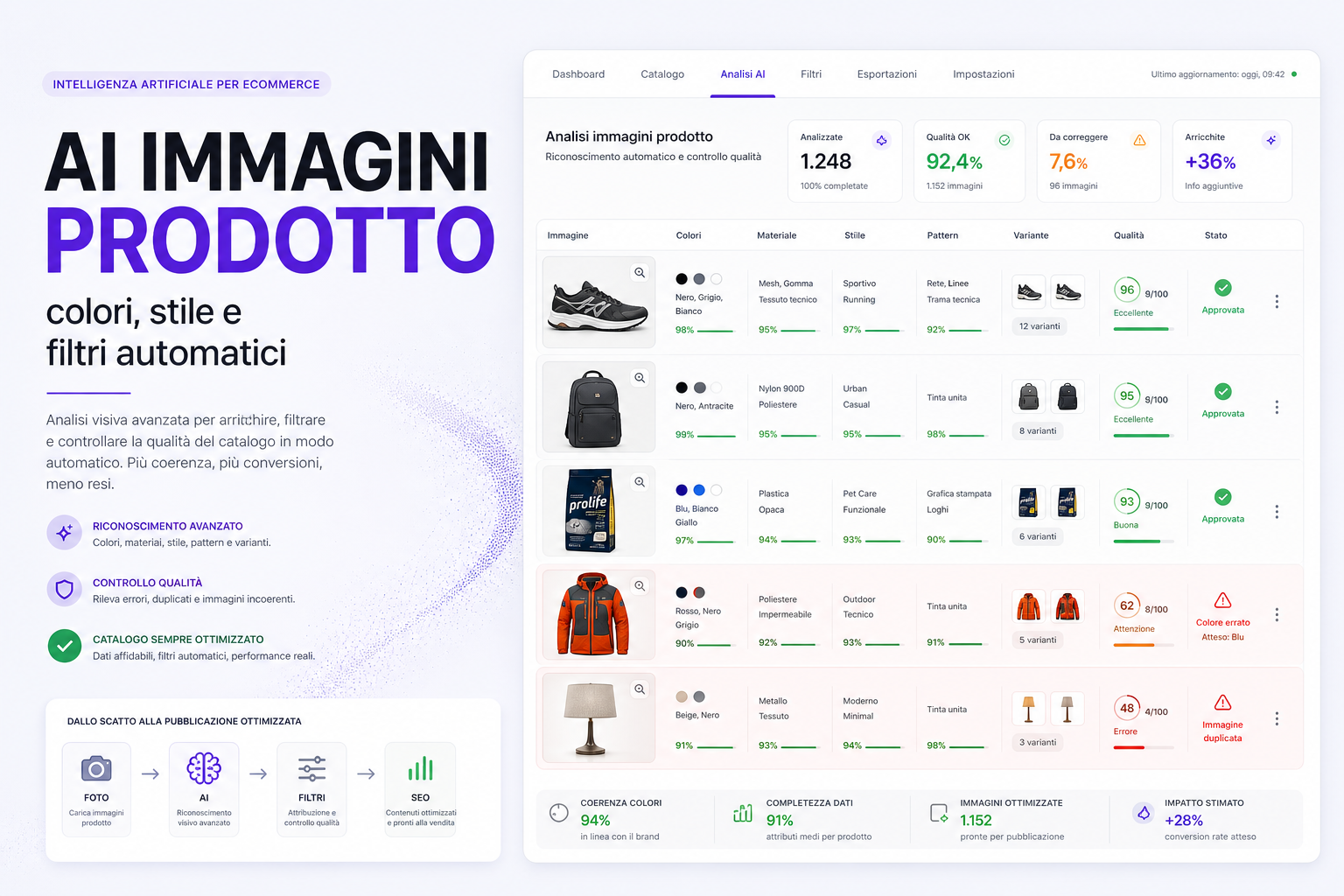
In many shops, images are used only to show the product. In reality they can become a source of data to improve catalogue, facets, SEO and conversions.
Every photo contains information that is often not properly written on the product page: the real colour, the visible material, the pattern, the style, the shape, the pack, the variant, the type of use, the presence of logos, the packaging, the background, the quality of the shot and how well it matches the title.
If that data stays "inside the photo", the site cannot use it. The customer cannot find it in the facets, Google cannot see it in the text, the advertising feed does not inherit it and the team has to keep fixing everything by hand.
AI image recognition exists precisely for this: to turn visual signals into useful, checkable data connected to the catalogue.
The problem: the catalogue sees text, the customer sees images
People buying online look at the images first. The ERP, on the other hand, almost always works on text fields: title, description, category, brand, code, price, attributes and facets.
This is where a very concrete problem starts.
- The product is red in the photo, but the colour facet is empty.
- The title says "blue", but the image shows a black variant.
- The category says "running shoes", but the photo shows a casual style.
- A product has a striped pattern, but there is no "striped" facet.
- The packaging is a multipack, but the product page does not say so.
- Two different variants use the same image.
- The main photo is blurred, cropped or poorly suited to the feed.
Taken one by one they look like details. On a large catalogue they become a huge problem: incomplete facets, worse navigation, a less effective feed, more returns and more manual work.
What AI can recognise from product images
A visual AI system can read images and propose structured information. It should not publish blindly, but it can speed up catalogue control enormously.
For example, it can help recognise:
- main colours: black, white, blue, red, beige, multicolour, secondary colours;
- style: sporty, technical, elegant, minimal, casual, professional, premium;
- pattern: plain, striped, checked, patterned, printed, visible texture;
- visible materials: leather, fabric, metal, plastic, rubber, glass, cardboard;
- format or pack: single, multipack, kit, bundle, refill;
- product type: bag, accessory, food, cosmetic, spare part, technical garment;
- likely use: outdoor, running, office, home, pet care, professional;
- image quality: blurred, too small, cropped, with a messy background;
- inconsistencies: duplicate image, wrong variant, colour that does not match the title.
This information only becomes useful when it is connected to rules, facets and quality checks. Otherwise it stays a pretty report that nobody uses.
Colours: the easiest facet to get wrong
Colour looks trivial, but in an eCommerce it is one of the most delicate attributes.
A user can search for "black backpack", "white shoes", "beige lamp", "grey dog bed" or "blue jacket". If the colour is not filled in properly, the product does not show up in the right facets and can lose sales even when it is perfect.
AI can help in three ways:
- it identifies the real colour visible in the photo;
- it compares that colour with title, description and variant;
- it proposes the correct colour facet or flags inconsistencies.
The important part is normalisation. If the catalogue has "navy blue", "dark blue", "navy", "blue" and "deep blue" as separate values, the facet becomes unmanageable. AI can suggest how to merge them, but you need a clear data structure: commercial colours for the user and technical colours for the catalogue.
Pattern, style and use: data nobody usually enters
Many useful facets do not come from suppliers. They come from the way customers search for and compare products.
A supplier can send you a correct spec sheet, but it does not always tell you whether a product is minimal, elegant, sporty, technical, beginner-friendly, premium, compact, discreet, outdoor or suited to a particular context of use.
Images can help generate these signals. Not as absolute truth, but as a proposal to verify.
Practical examples:
- a shoe can be classified as "running", "trail", "casual" or "lifestyle";
- an accessory can be "minimal", "professional", "technical" or "premium";
- a pet product can show format, packaging, flavour or visual range;
- a garment can have a "plain", "striped", "printed" or "graphic" pattern;
- a home product can be "modern", "industrial", "classic" or "natural".
This data improves navigation and can generate new SEO opportunities, especially if it becomes real facets and pages instead of simple hidden parameters.
Visual AI and automatic facets: where the advantage is
The advantage is not just "recognising the image". The advantage is automating the next step.
If a product is recognised as black, technical, outdoor and waterproof, the system can propose applying the right facets. If the rule is safe, it can apply them automatically. If confidence is low, it can send them for review.
In practice you can work like this:
- the AI analyses images, title, description, brand and category;
- it proposes consistent attributes and facets;
- it assigns a confidence level;
- it automatically applies only the safe cases;
- it sends ambiguous cases for approval;
- it logs the changes;
- it learns from the team's corrections.
This makes it possible to manage large catalogues without depending solely on the memory of whoever uploads the products.
Image quality control: it is not all about SEO
Product images are not only there for Google. They are there above all to sell.
An AI check can flag problems that often slip through as the catalogue grows:
- missing or too small main photo;
- duplicate images across different variants;
- product cropped or barely visible;
- background inconsistent with the site's style;
- photo that does not match the selected colour;
- old images compared with new packaging;
- no detail, pack, back or size photos;
- images unsuitable for Merchant Center or social.
This matters a lot, because a wrong image can generate returns, doubts, abandoned carts and pointless support requests. Customers buy what they see: if they see it badly, they decide badly.
Images, Google Shopping feed and Merchant Center
Images also have an impact on Shopping and Performance Max campaigns. In the feed, the main image field and the additional images are fundamental signals for presenting the product well.
An automatic check can help identify:
- missing or unreachable images;
- photos that are too small;
- images inconsistent with title and variant;
- products with few images compared with competitors;
- product pages missing a detail photo that would help conversion;
- images that make colour or format unclear.
A technically valid feed is not enough. You need a useful feed: title, price, availability, attributes and images all have to tell the same story.
This connects to the work on the Merchant Center feed, Google Shopping custom labels and Google Ads for eCommerce.
The risk: letting AI decide everything
Image recognition must not become a blind system that changes the catalogue without any control.
There are cases where AI can get it wrong:
- images with odd lighting or altered colours;
- products photographed with different packaging;
- lifestyle photos where the product is not isolated;
- colour variants that are barely visible;
- bundles with several objects in the same image;
- materials that look similar to each other;
- brands with ambiguous naming or graphics.
That is why the system needs rules: confidence thresholds, approvals, a change history, rollback and human review on important products.
AI is an assistant, not the owner of the catalogue.
How we integrate it into a custom eCommerce
On a custom eCommerce, image recognition can become part of the cataloguing flow.
The ideal process is this:
- the product is imported from the ERP, the supplier or the back office;
- the system reads images, title, description, brand, category and existing attributes;
- the AI proposes colours, style, pattern, visible material, use and possible facets;
- automatic rules apply only what passes safe thresholds;
- the team sees a prioritised review queue;
- approved changes update catalogue, facets, site search and feed;
- the corrections help improve the rules for next time.
The point is to make visual AI, AI for the eCommerce catalogue, site search, SEO and product management work together.
Which KPIs to watch
To understand whether the system is delivering value, counting how many images have been analysed is not enough.
More useful metrics:
- products with a missing colour before and after;
- facets applied automatically and approved;
- image errors detected and fixed;
- products with duplicate images across variants;
- reduction in no-results site searches;
- use of colour, style or pattern facets;
- change in conversion rate on the improved categories;
- reduction in returns linked to colour, model or expectation;
- products improved in the Merchant Center feed.
If the AI does not improve data, user experience and sales, it stays an experiment. It has to become operational infrastructure.
What to ask your agency or your developer
Before switching on an image recognition system, ask these questions.
- Does the AI work only on images, or does it also cross-check title, description, brand and category?
- Are there confidence thresholds before a facet is applied?
- Which fields are updated automatically and which require approval?
- Does the system keep a change history?
- Can wrong changes be rolled back?
- How do we handle colour variants and duplicate images?
- How do we normalise similar colours and attributes?
- Does the data also update site search, the feed and SEO facet pages?
- Who reviews the ambiguous cases?
- How do we measure whether the work improves sales and navigation?
If the answer is "the AI recognises everything and updates everything on its own", be careful. Serious catalogues need control.
Useful sources
To connect images, product data and feed we looked at the Google Merchant Center documentation on the image_link and additional_image_link attributes, the Shopify documentation on the MediaImage object and the OpenAI documentation on image inputs in multimodal models.
FAQ
Can image recognition apply product facets automatically?
Yes, but it is best to do so only when confidence is high and the rules are clear. For ambiguous cases it is better to create an approval queue.
Is it only useful for the colour facet?
No. Colour is the most immediate case, but AI can also help with style, pattern, visible material, pack, image quality, variants and catalogue consistency.
Can AI get the colour wrong?
Yes. Lighting, backgrounds, packaging and lifestyle photos can distort the result. That is why visual data has to be cross-checked with title, description, variant and catalogue history.
Does this help SEO?
It helps when the data becomes facets, pages, copy, site search and useful links. Recognition on its own does not do SEO: it improves the data foundation SEO works on.
Does it help Google Shopping too?
Yes, especially in quality control: missing images, wrong variants, unclear photos and inconsistencies between image, title and attributes can penalise feed and campaigns.
Do you need a custom platform?
Not always, but a custom platform makes it easier to connect AI, catalogue, facets, site search, feed, reviews and automatic rules.
Do you want to use images to improve your catalogue?
We can analyse your catalogue, work out which attributes are missing, which facets can be automated and how to use visual AI without losing control of your product data.